Built-in projector

Not just chords — a full projection app too

Chords365 also includes a complete, built-in projection app. From a single browser control panel you assemble and drive the whole event's projection — lyrics, image slideshows, videos and slides imported from presentations — without installing a separate program.

If the embedded player doesn't load, open the video on YouTube.

ProPresenter · OpenLP · Chords365

A full projection app — right in your browser

Know ProPresenter or OpenLP? Chords365 is in the same category: a full-fledged projection app — only it isn't a separate installed program, it runs in your browser, from any computer.

ProPresenter

Paid, installed desktop program (macOS / Windows).

OpenLP

Free, open-source, installed desktop program.

Chords365

Free and runs in the browser — nothing to install, right where you manage your songs too.

All three do the same job: projecting lyrics, images, video and slides at your event. The difference is that Chords365's projector runs in your browser — no separate program, no separate license — right where you manage your songs and setlists too.

Feature ProPresenter OpenLP Chords365
Full projector: lyrics, image, video, presentation Yes Yes Yes
No installation — launches from the browser No No Yes
On any computer (regardless of operating system) Partial Yes Yes
Free, watermark-free projection Partial Yes Yes
Integrated with your own songs and setlists No No Yes
Updates automatically, always up to date No No Yes
Works offline, without internet Yes Yes Yes
PPTX/PPT/ODP/PDF import into a ready image slideshow Partial Partial Yes
Presentations without PowerPoint/LibreOffice on the projector machine Yes No Yes
Extra slides: text, scripture, image, video and slideshows in one playlist Yes Yes Yes
OBS / streaming Browser Source lyric overlay Partial No Yes
QR-paired separate projector machine or Cast output No No Yes
Phone remote without signing in Partial Yes Yes
Multiple output roles: audience, timer, overlay Yes Partial Yes

A dash (–) marks partial support: a separate app, active subscription, platform limit or installed PowerPoint/LibreOffice component may be required. This comparison is based on publicly available information as of July 2026; ProPresenter and OpenLP are trademarks of their respective owners.

A single control panel for the whole projection

Based on the opened setlist, in a ProPresenter-style operator interface.

Control panel

Live control panel and preview

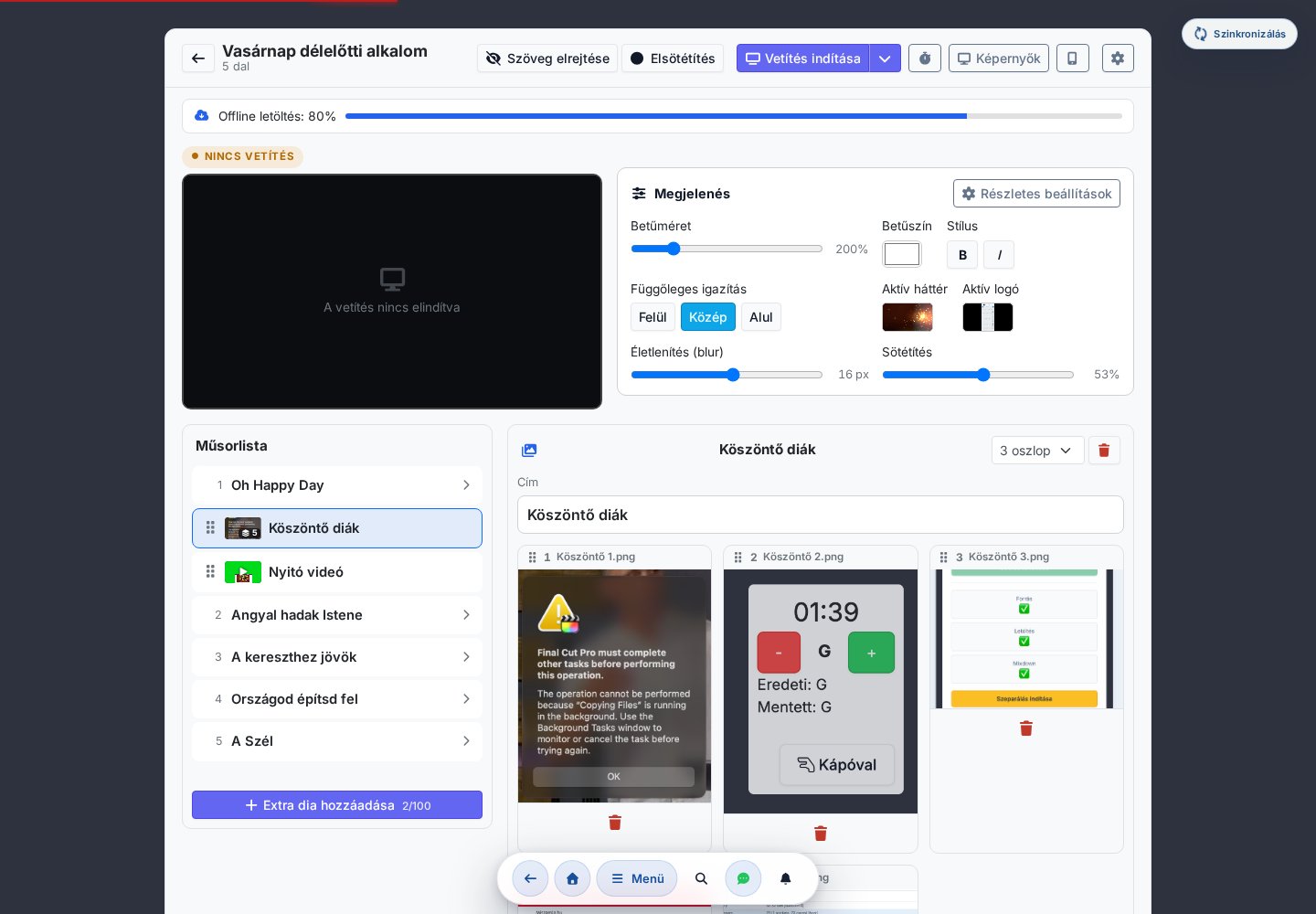
The left-hand Playlist keeps the setlist's songs and extra slides in one place; on the right, the slides or the media player. Up top, the live preview is an exact mirror of the projector, and the look (font size, color, background, logo) is one click away. Launch to an external display, wireless Cast or QR pairing — the button remembers the mode you used last.
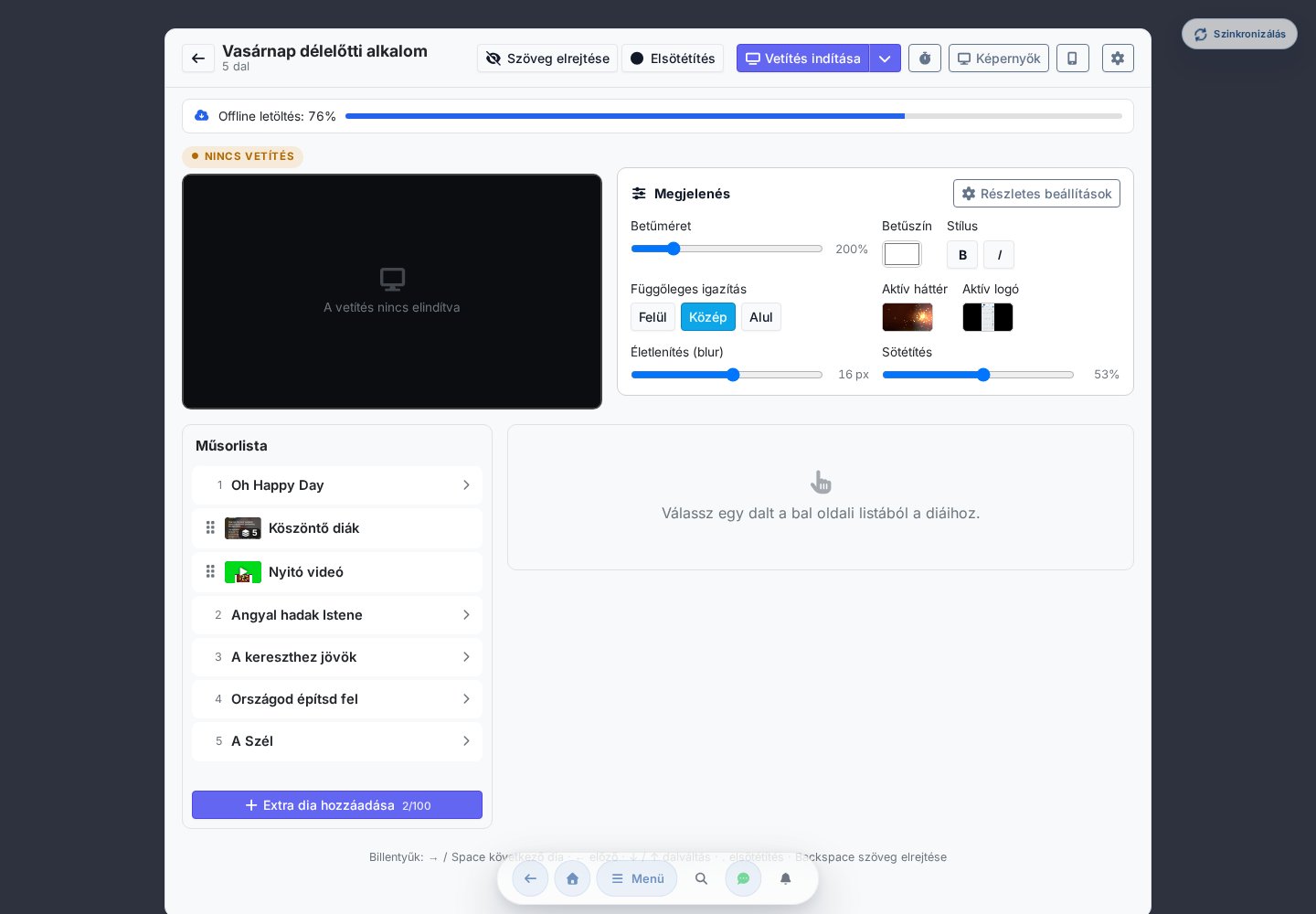
The Chords365 projection control panel: Playlist, live preview and appearance settings
Any content

Lyrics, images, video and presentations

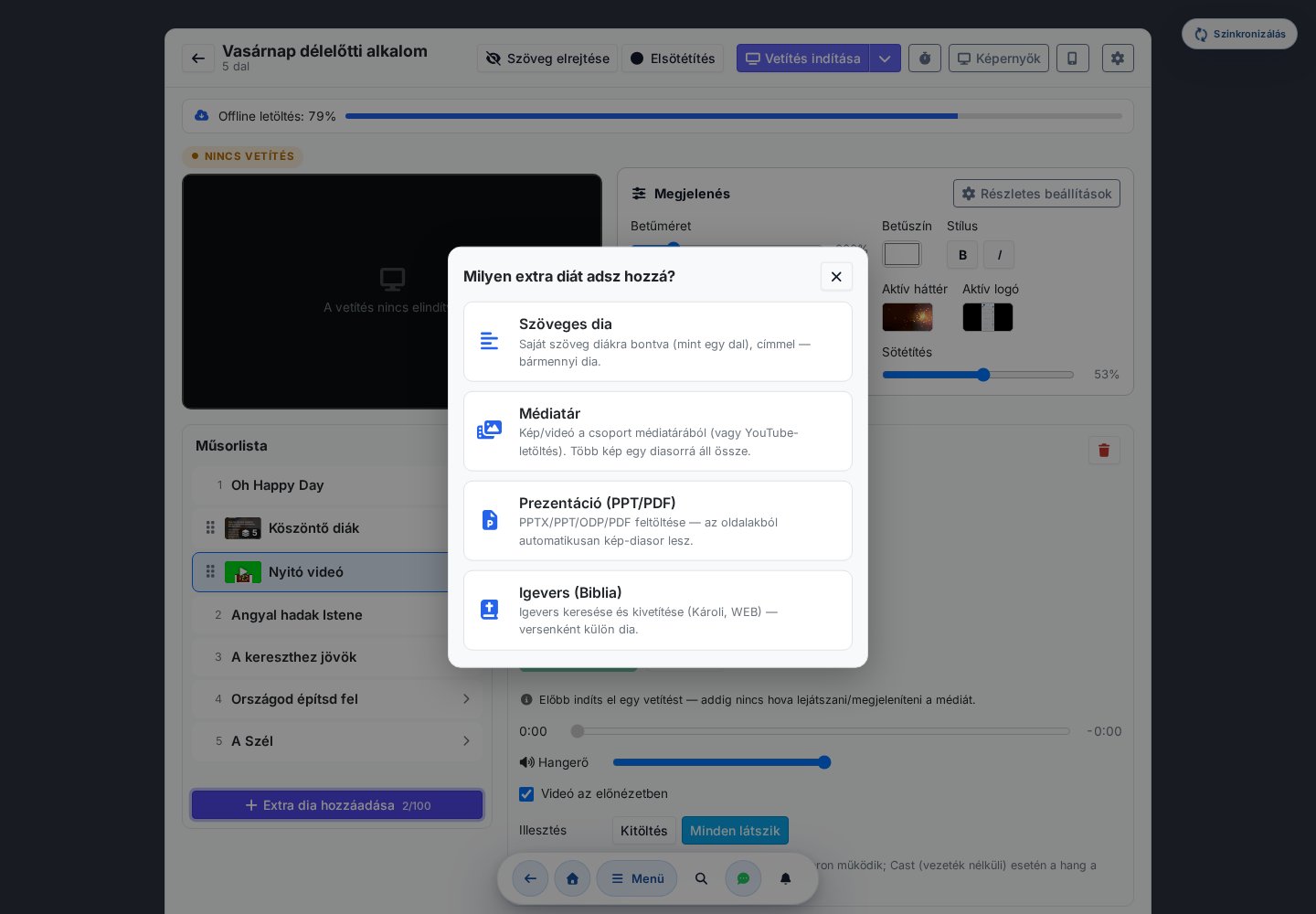
"Add extra slide" offers three sources: free-form text slides (a Bible verse, an announcement or a prayer), images and videos from the shared media library (even downloaded from YouTube), and full presentations. Songs and extra slides line up in a single Playlist and can be dragged anywhere to reorder them.

Add extra slide: text slide, media library or presentation import
Image slideshows and import

Image slideshows and presentation import

Several images combine into a single image slideshow you page through slide by slide. A PPTX / PPT / ODP / PDF file is converted into page images on the server and turned into a ready-made slideshow — no separate export or conversion needed.

Image slideshow editor: reorderable images in a single slideshow
Media player and offline

Embedded media player, offline safety

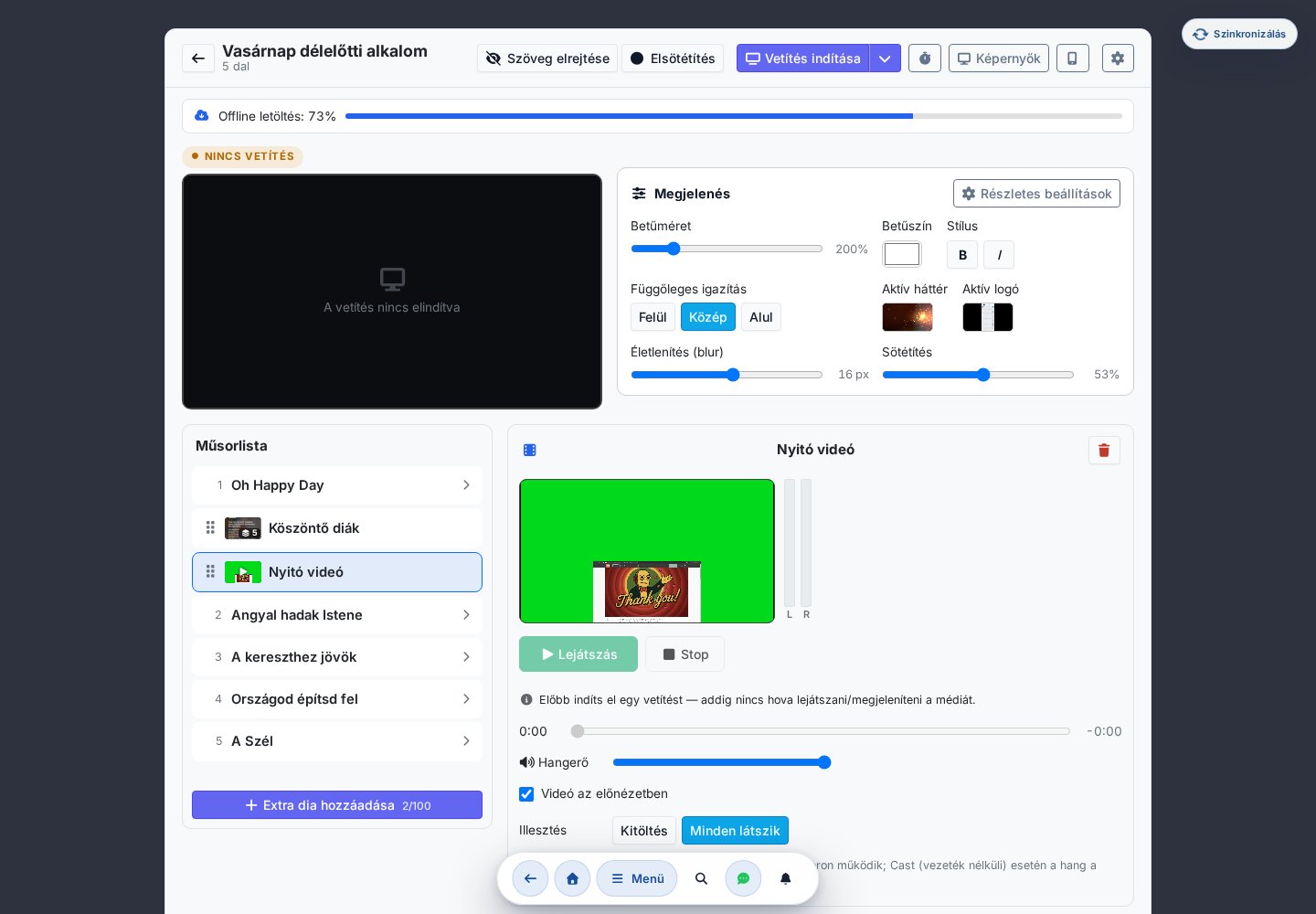
Videos are driven by an embedded player: play, pause, stop, volume, seeking, and — where the browser allows — a separate physical audio output too. The entire contents of an opened setlist download to your machine, so projection runs reliably even without an internet connection.

Embedded media player: playback, volume, progress bar and audio output selection
Streaming

OBS / streaming overlay

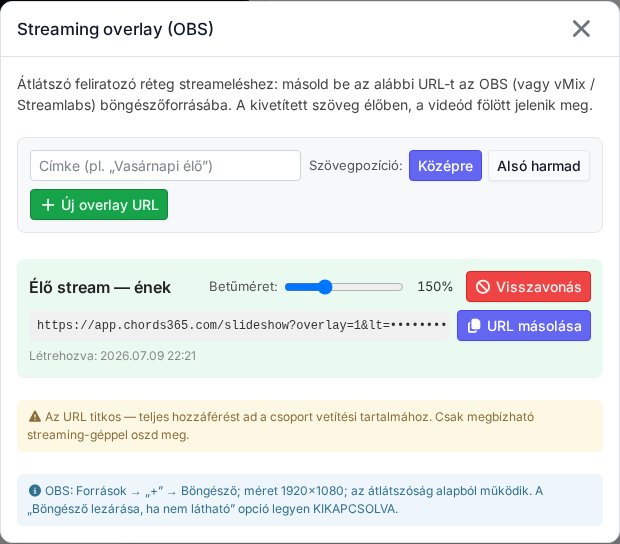
Streaming your event? Put the lyrics on the video as a transparent-background caption layer — no separate projection software. Generate a copyable Browser Source URL (OBS, Streamlabs, vMix), and the projected text appears live, over the video. Several overlays can run at once, and any link can be revoked with a single click.

OBS / streaming overlay: a copyable, revocable Browser Source URL for captioning your stream
PPT slideshow

A ready slideshow from your presentation

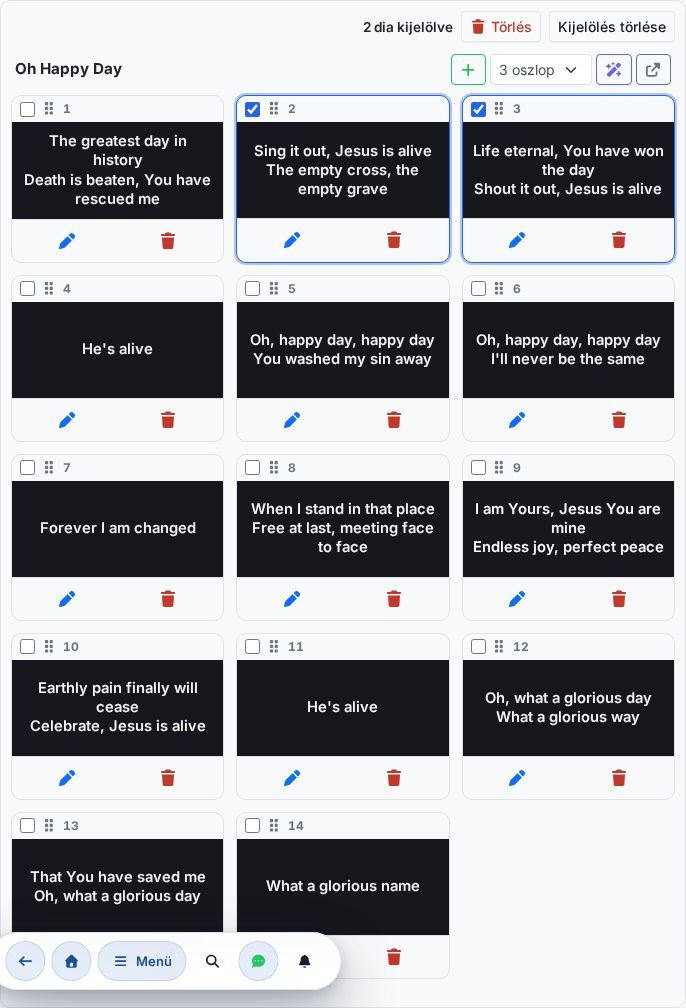
Upload a PPTX, PPT, ODP or PDF file and Chords365 turns each page into an image, then adds it to the setlist as a ready-to-project image slideshow. No PowerPoint or LibreOffice needs to be installed on the projection machine, and there is no manual export step: slides can be reordered, removed and projected in one place.

A slideshow created from PPT/PDF import: slide grid, selection, reordering and deletion
Multiple displays

Multiple displays, one controller

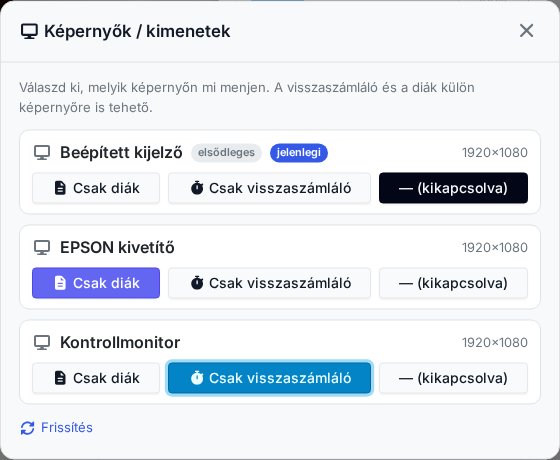
A single control panel can drive several projectors, each screen with its own role: lyrics on one, the countdown on another. The audience sees the slides while the stage display shows the timer — set per wired display.

Screens / outputs: a Slides only or Countdown only role per screen
Project to an external display (Chrome / Edge)
Wireless Cast (Chromecast)
A separate projector machine with QR pairing
Works offline too — with downloaded content
OBS / streaming overlay — transparent caption layer
PPT/PDF/ODP import — as a ready slideshow
Countdown / timer on the projector

Try the built-in projector

No separate installation and no separate license — projection is part of Chords365. Open it with a setlist and you're ready to go.