What is it?
A shared workshop for your team. Songs and chords, setlists, rehearsal, stage view and projection — all in one place, and always the same in everyone's hands.
From the song through rehearsal to the stage and projection — Chords365 weaves your shared work into a single clear flow, so your whole team can work from the same source and you can focus on what really matters.
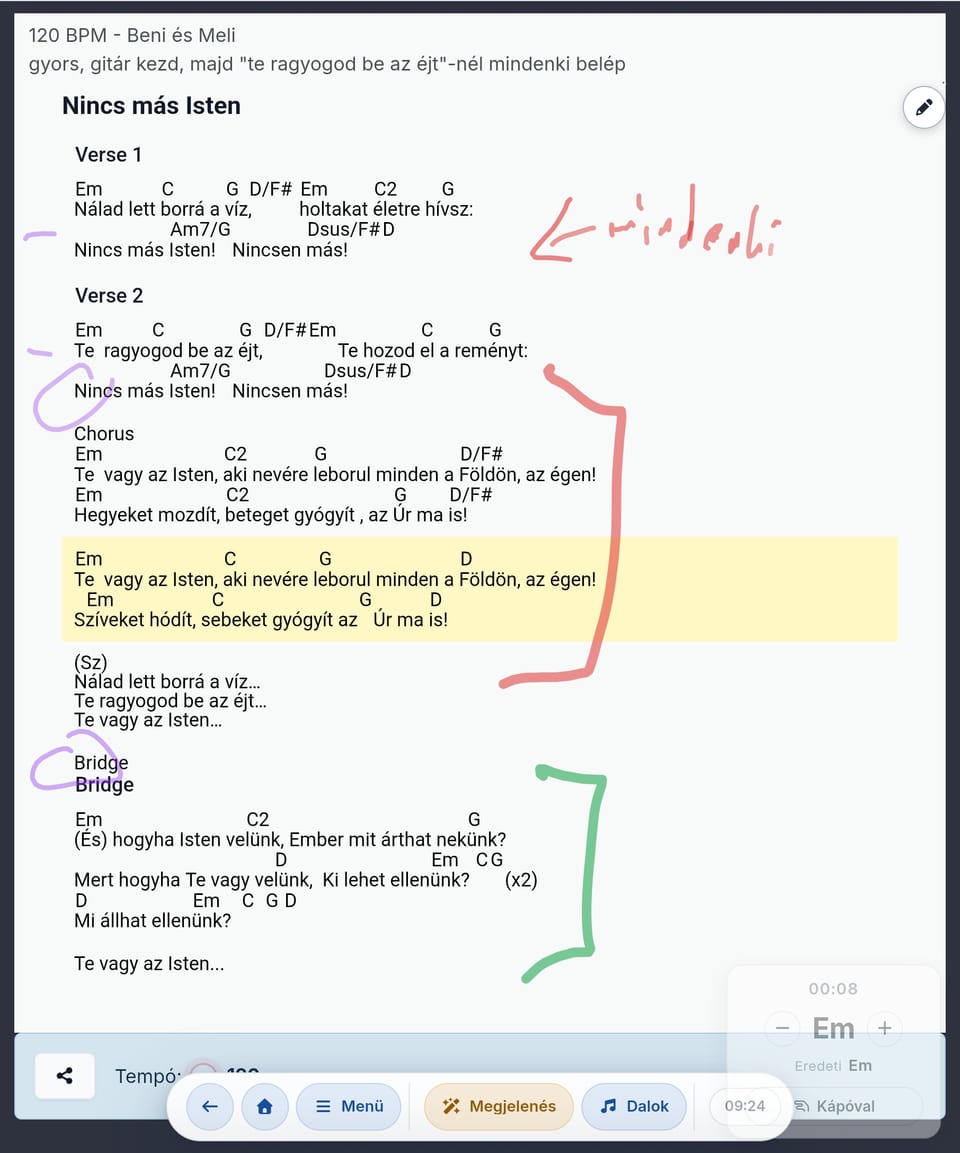
A shared workshop for your team. Songs and chords, setlists, rehearsal, stage view and projection — all in one place, and always the same in everyone's hands.
Because it doesn't solve just one piece of the puzzle — it connects the whole journey. From preparation to performance the process stays clear — no scattered files, lost messages or separate apps.
Anyone involved in a musical occasion — from the leader through singers and players to the projection operator. Pick the role that's yours, and we'll show you how it helps.
Pick your role, and we'll tailor what you see to you.
Chords365 isn't a ready-made song catalog — it's a digital chord book: you decide what goes in and where it comes from. Type a song in, import it from ChordPro or ZIP, photograph the paper chart, or pull it in from several public song libraries — then add audio recordings and stem sets alongside (even from YouTube) to make learning easier for singers and players alike. Its greatest strength is that the whole team's life comes together in one place: shared setlists, events, media library and broadcast messages. Built by one musician, for musicians — from the heart.
Know Planning Center Music Stand, OnSong, forScore, MobileSheets or SongBook+? Chords365 is in the same category: a digital sheet music organizer for musicians and music teams — only it isn’t a separate installed program, it runs in your browser, on any device.
Planning Center’s app for musicians: it displays the setlists and chord charts built in Planning Center Services — on mobile and in the browser, with an active Planning Center subscription.
A popular, Apple-only (iOS/macOS) chord-chart app with song management, transposition, live device sync and projection.
The best-known Apple-only (iPad/iPhone/Mac) PDF sheet-music reader: it manages scores and setlists, but isn’t chord-based.
Runs in the browser and on every platform, free to start — a chord and sheet-music organizer with built-in team sync and projection.
They all help with the same job: organizing songs, chords, lyrics and setlists from rehearsal to stage. The difference is that Chords365 runs in your browser — no install, no device lock-in — with both H and B note naming, built-in projection and offline support.
| Feature | Music Stand | OnSong | forScore | Chords365 |
|---|---|---|---|---|
| Organize songs, chords, lyrics and setlists | Yes | Yes | Partial | Yes |
| Runs in the browser — no install | Yes | No | No | Yes |
| On any device (Windows, macOS, Linux, iOS, Android) | Partial | Partial | No | Yes |
| Free core features | No | Partial | No | Yes |
| H and B note naming | No | Yes | No | Yes |
| Real-time team sync (Music Director mode) | Yes | Yes | No | Yes |
| Built-in projection (lyrics, image, video) | No | Yes | No | Yes |
| Works offline too | Yes | Yes | Yes | Yes |
A dash (–) marks partial or plan-dependent support: OnSong’s free tier is limited (transposition, projection and sync require a subscription), and Planning Center Music Stand requires an active Planning Center subscription. This comparison is based on publicly available information as of July 2026; features and pricing may change. Planning Center Music Stand, OnSong, forScore, MobileSheets and SongBook+ are trademarks of their respective owners and are not affiliated with Chords365.
It's not a licensed song catalog and not a complete team management system. You upload your own songs that you have the right to use, and Chords365 adds what's missing at rehearsal and performance: quick search, shared setlist, chord notation, offline reliability and stage usability.
Users are responsible for only uploading and using content they have the rights to. Chords365 is not a public song catalogue and does not distribute copyrighted music.
A one-person labour of love, running since 2022. It started out as chords.hu and has now opened up to the world as chords365.com - but the heart of it hasn't changed: built by one musician, for musicians.
No separate password, no lengthy registration.
Members join via invitation link; the admin approves them.
ChordPro, ZIP, photographed sheet music or import from several public sources — whatever's convenient for you.
Setlist, key, pedal, multitrack, MD following and projection all come together here.
Independent articles and write-ups featuring Chords365.
One group, a few songs, one setlist — that's enough for the first real experience.
Open Chords365